
Skip to content
Zoota

How Zoota works

What happens between pressing record and hearing your speed, and what each ball then gives you.

Recorded on one phone at the nets.

Set up in three steps

  1. Step 1: Set up

    Put your phone on a tripod behind the bowler's end, facing down the pitch, with both sets of stumps in frame.

  2. Step 2: Bowl

    Zoota finds the release and tracks the ball. Your speed is called out loud seconds after you bowl.

  3. Step 3: Review

    Go back through the session ball by ball in the app.

Filming for the first time? Read the filming tips.

What every ball measures

From the hand

Speed
Calibrated to the real 20.12 m pitch from the stumps in frame.
Release
Zoota finds the release frame on its own and measures how high the ball left your hand and how wide of the stumps you were.
Bowling style
Detected automatically from the flight of the ball.
In flight

Swing and spin
Swing before the bounce and seam or spin after it are separated and measured, so you see both on every ball.
3D trajectory
The full path of the ball, rebuilt in 3D from release to the stumps.

On the pitch

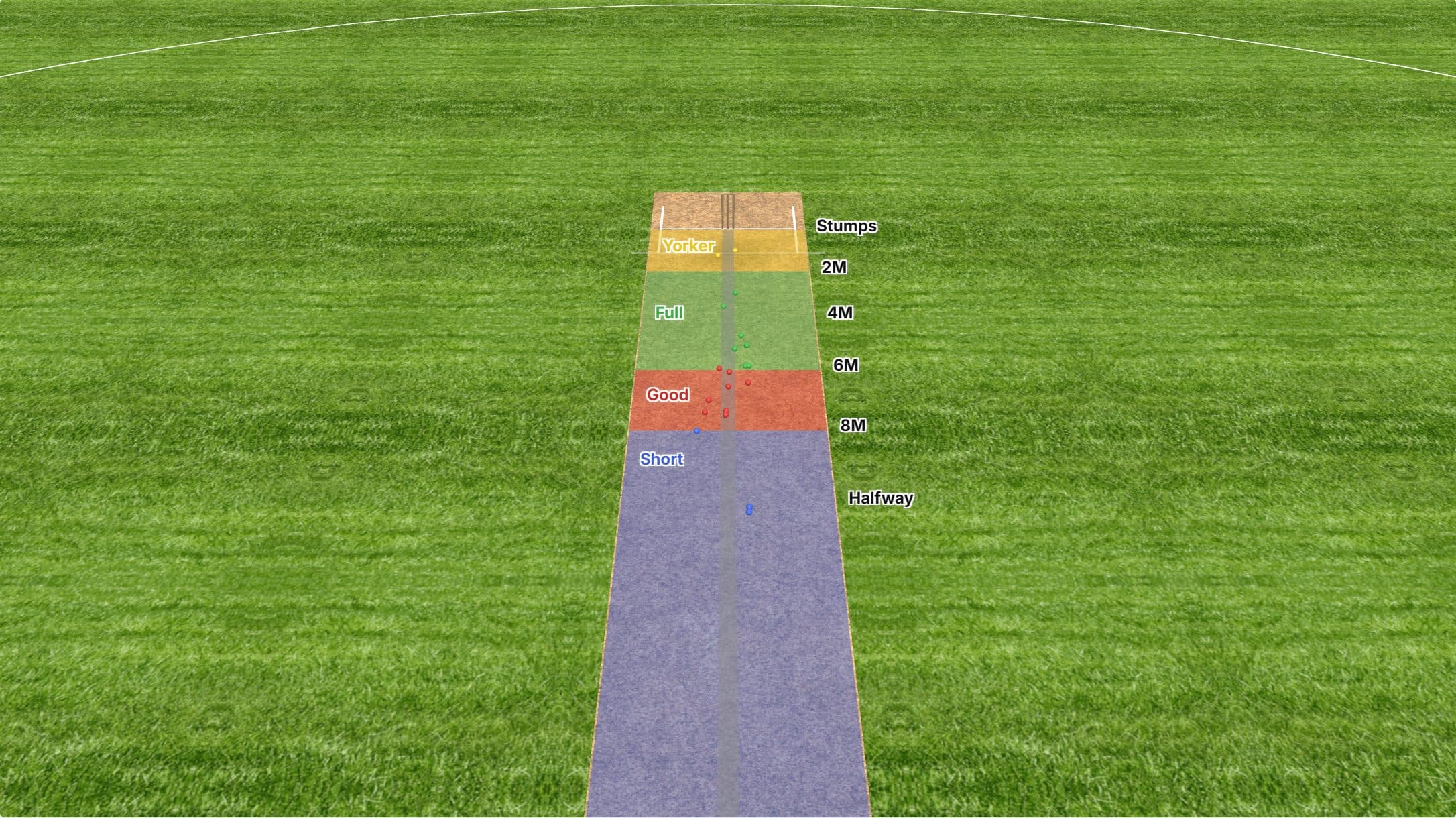
Pitch map
Every ball gets a length and a line and drops onto the pitch map with everything else you have bowled.
Breakdowns
Filter and compare your stats by session, length and line.

At the stumps

Arrival map
Where the ball crosses the batting crease, plotted front-on: a tight cluster at the top of off, or a spread you can work on.
DRS review
The flight is projected on past the pad: pitching, impact and wickets, the same three verdicts you see on television.

Video highlights

On Pro every delivery is clipped to video with your numbers on the footage, plus slow motion and zoom.

Also in the app: leaderboards, to see where your pace ranks, including against your club.

Every delivery, rebuilt in 3D

A 20 ball spell, every ball coloured by where it pitched. Drag to look around, tap any delivery.

What the numbers mean

Speed
Kilometres per hour, measured on every ball.
Swing factor (sf)
Movement through the air before the bounce, signed: positive is away from a right-hander, negative is in-swing to one.
Spin (deg)
Degrees of deviation off the pitch, the part of the movement after the ball lands, measured separately from swing.
Length (m)
Metres from the batter's stumps back down the pitch, which is how the app groups a delivery into its four length bands. The boundaries are a default and a coach can move them in Pitch Zones.
Line (m)
Metres to the side of middle stump where the ball bounced, signed: positive is the off side.

Filming tips

Where to stand

Set the tripod 4 m behind the bowler's stumps, with the lens about 1.6 m off the ground. Then check that both sets of stumps are fully in shot: Zoota calibrates off them, so it has to see them.

Camera settings

Shoot at 60fps or higher if your phone allows. Faster frame rates mean sharper tracking and more precise speed.

Lighting

Daylight or bright nets work best. Avoid heavy backlight directly behind the bowler's arm.

Then just bowl

No markers to print and nothing to measure out. Zoota finds the stumps and creases in the frame and solves the camera itself. On an uploaded clip you confirm your camera’s field of view once, and it does the rest.